> For the complete documentation index, see [llms.txt](https://docs.dietrichs.com/llms.txt). Markdown versions of documentation pages are available by appending `.md` to page URLs; this page is available as [Markdown](https://docs.dietrichs.com/dietrichs-intelligent-documentation/francais/geometrie-daide-2d/bemassungen/massketten/massketten-schieben.md).

# Chaîne de cotations | Déplacer - Aligner - Orienter

Mit den Schiebefunktionen kann man Teile oder ganze Maßketten senkrecht zur Maßlinie verschieben. Es stehen folgende Funktionen zur Verfügung:

## Déplacer | Une seule cote

<figure><img src="/files/vRhnUyjIh7lsrYuy5sJB" alt=""><figcaption><p>(Déplacer) Une seule cote</p></figcaption></figure>

<table><thead><tr><th width="125">Rac. clavier</th><th>Environnement</th><th>Menus déroulants</th><th data-hidden></th></tr></thead><tbody><tr><td>05.3.<mark style="color:blue;">1</mark></td><td>Bâtiment ou DI-PROFIL</td><td>Cotations • Déplacer - Aligner - Orienter • <mark style="color:blue;">Une seule cote</mark></td><td></td></tr><tr><td>5.3.<mark style="color:blue;">1</mark></td><td>DI-PLAN</td><td>Cotations • Déplacer - Aligner - Orienter • <mark style="color:blue;">Une seule cote</mark></td><td></td></tr></tbody></table>

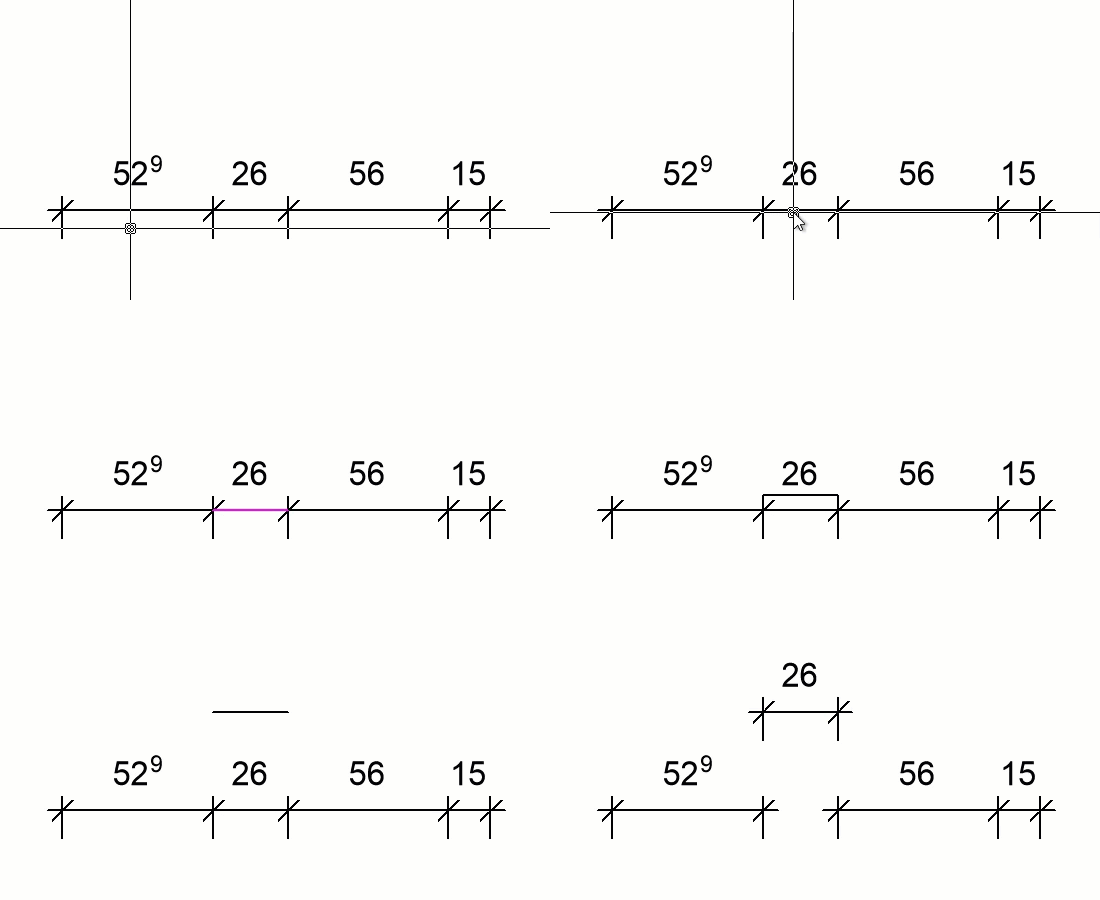
Avec la fonction "(Déplacer) *Une seule cote*", vous pouvez déplacer une seule cote appartenant à une chaîne de cotation. La ligne déplacée appartient toujours à la chaîne de cotation.

<figure><img src="/files/PJoizoDpIdEcD0RZ2NXo" alt="" width="275"><figcaption></figcaption></figure>

## Déplacer | Plusieurs cotes

<figure><img src="/files/gSmw5vE4ajAWLvgu3MtS" alt=""><figcaption><p>(Déplacer) Plusieurs cotes</p></figcaption></figure>

<table><thead><tr><th width="125">Rac. clavier</th><th>Environnement</th><th>Menus déroulants</th><th data-hidden></th></tr></thead><tbody><tr><td>05.3.<mark style="color:blue;">2</mark></td><td>Bâtiment ou DI-PROFIL</td><td>Cotations • Déplacer - Aligner - Orienter • <mark style="color:blue;">Plusieurs cotes</mark></td><td></td></tr><tr><td>5.3.<mark style="color:blue;">2</mark></td><td>DI-PLAN</td><td>Cotations • Déplacer - Aligner - Orienter • <mark style="color:blue;">Plusieurs cotes</mark></td><td></td></tr></tbody></table>

Avec la fonction "Plusieurs cotes", une partie (=zone) d'une chaîne de cotations est déplacée. La zone à déplacer est sélectionnée en cliquant sur deux lignes de rappels.

<figure><img src="/files/eect46li2tJxgBY8gsmg" alt="" width="250"><figcaption></figcaption></figure>

## Déplacer | Chaîne complète

<figure><img src="/files/yerA4kGeW7QEYvsHDnhU" alt=""><figcaption><p>(Déplacer) Chaîne complète</p></figcaption></figure>

<table><thead><tr><th width="125">Rac. clavier</th><th>Environnement</th><th>Menus déroulants</th><th data-hidden></th></tr></thead><tbody><tr><td>05.3.<mark style="color:blue;">3</mark></td><td>Bâtiment ou DI-PROFIL</td><td>Cotations • Déplacer - Aligner - Orienter • <mark style="color:blue;">Chaîne complète</mark></td><td></td></tr><tr><td>5.3.<mark style="color:blue;">3</mark></td><td>DI-PLAN</td><td>Cotations • Déplacer - Aligner - Orienter • <mark style="color:blue;">Chaîne complète</mark></td><td></td></tr></tbody></table>

Avec la fonction "Chaîne complète", la chaîne de cotations sélectionnée est déplacée complètement.

## Réaligner

<figure><img src="/files/xBnoVV03rwVEUODdZkC2" alt=""><figcaption><p>Réaligner</p></figcaption></figure>

<table><thead><tr><th width="125">Rac. clavier</th><th>Environnement</th><th>Menus déroulants</th><th data-hidden></th></tr></thead><tbody><tr><td>05.3.<mark style="color:blue;">4</mark></td><td>Bâtiment ou DI-PROFIL</td><td>Cotations • Déplacer - Aligner - Orienter • <mark style="color:blue;">Réaligner</mark></td><td></td></tr><tr><td>5.3.<mark style="color:blue;">4</mark></td><td>DI-PLAN</td><td>Cotations • Déplacer - Aligner - Orienter • <mark style="color:blue;">Réaligner</mark></td><td></td></tr></tbody></table>

Les fonctions "[Une seule cote](#deplacer-or-une-seule-cote)" et "[Plusieurs cotes](#deplacer-or-plusieurs-cotes)" permettent de déplacer une ou plusieurs lignes d'une chaîne de cotations hors de la chaîne de cotation. La fonction "Réaligner" permet de rassembler ces différentes parties de la chaîne de cotation sur une même ligne de cotations. Un simple clic sur la ligne de cotations correspondant à la position souhaitée suffit pour la création de la chaîne de cotations finale. Toutes les lignes de la chaîne de cotations sont alors à nouveau sur une seule ligne, comme lors de la création de la chaîne de cotations.

<figure><img src="/files/t9FFTpkInYwv9M2mTfjr" alt="" width="250"><figcaption></figcaption></figure>

## Aligner

<figure><img src="/files/OVsd8Tf0agKtvSR3jRhq" alt=""><figcaption><p>Aligner</p></figcaption></figure>

<table><thead><tr><th width="125">Rac. clavier</th><th>Environnement</th><th>Menus déroulants</th><th data-hidden></th></tr></thead><tbody><tr><td>05.3.<mark style="color:blue;">5</mark></td><td>Bâtiment ou DI-PROFIL</td><td>Cotations • Déplacer - Aligner - Orienter • <mark style="color:blue;">Aligner</mark></td><td></td></tr><tr><td>5.3.<mark style="color:blue;">5</mark></td><td>DI-PLAN</td><td>Cotations • Déplacer - Aligner - Orienter • <mark style="color:blue;">Aligner</mark></td><td></td></tr></tbody></table>

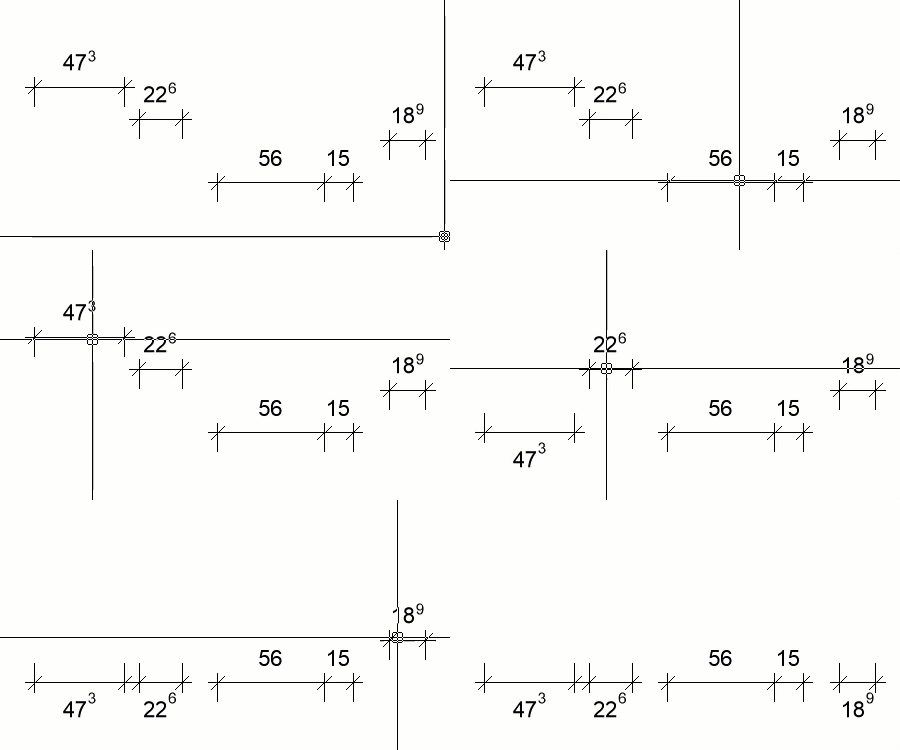
Avec la fonction "Aligner", plusieurs chaînes de cotations peuvent être alignées sur une même ligne. Tout d'abord, il est nécessaire de cliquer sur la chaîne de cotation qui détermine la position de la chaîne de cotation finale. Ensuite, il est possible de cliquer sur autant d'autres chaînes que l'on souhaite. Celles-ci doivent être parallèles à la première chaîne de cotations. Chaque chaîne de cotation parallèle cliquée est immédiatement déplacée à la hauteur de la première chaîne de cotations. Attention toutefois à ne pas sélectionner des chaînes de cotation qui se superposent sans quoi la lecture de la chaîne de cotation serait compliquée.

<figure><img src="/files/O9eTO9m0yEiDtDH92LoD" alt="" width="338"><figcaption></figcaption></figure>

## Mesures seules

<figure><img src="/files/DPwGy5RfLfpELEV1BWzM" alt=""><figcaption><p>Mesures seules</p></figcaption></figure>

<table><thead><tr><th width="125">Rac. clavier</th><th>Environnement</th><th>Menus déroulants</th><th data-hidden></th></tr></thead><tbody><tr><td>05.3.<mark style="color:blue;">6</mark></td><td>Bâtiment ou DI-PROFIL</td><td>Cotations • Déplacer - Aligner - Orienter • <mark style="color:blue;">Mesures seules</mark></td><td></td></tr><tr><td>5.3.<mark style="color:blue;">6</mark></td><td>DI-PLAN</td><td>Cotations • Déplacer - Aligner - Orienter • <mark style="color:blue;">Mesures seules</mark></td><td></td></tr></tbody></table>

La fonction "Mesures seules" permet de déplacer un seul texte de cotation. Cela peut être utile si ce texte superpose un autre élément empêchant sa lecture. Ce déplacement est même conservé si l'ensemble de la chaîne est déplacé par la suite. Le texte de cotation est sélectionné puis placé à l’endroit de son choix.

<figure><img src="/files/DICd9a4q7IdYCRgLLSdO" alt=""><figcaption></figcaption></figure>

## Orienter mesures

<figure><img src="/files/IT2dYo0tu10wPi0MbH8p" alt=""><figcaption><p>Orienter mesures</p></figcaption></figure>

<table><thead><tr><th width="125">Rac. clavier</th><th>Environnement</th><th>Menus déroulants</th><th data-hidden></th></tr></thead><tbody><tr><td>05.3.<mark style="color:blue;">7</mark></td><td>Bâtiment ou DI-PROFIL</td><td>Cotations • Déplacer - Aligner - Orienter • <mark style="color:blue;">Orienter mesures</mark></td><td></td></tr><tr><td>5.3.<mark style="color:blue;">7</mark></td><td>DI-PLAN</td><td>Cotations • Déplacer - Aligner - Orienter • <mark style="color:blue;">Orienter mesures</mark></td><td></td></tr></tbody></table>

La fonction "Orienter mesures" peut être appliquée aux cotations classiques (chaînes de cotations relatives) mais pas aux cotations cumulées (chaînes de cotations absolues). Les textes de cotations peuvent être parallèles ou perpendiculaires à la ligne de cotes, selon la situation. La chaîne de cotations décide elle-même de la manière dont les chiffres doivent être affichés. Il peut toutefois arriver que l'on souhaite influencer ce processus automatique. Avec la fonction "Orienter mesures", l'orientation des textes de cotation peut être modifiée avec les options "Automatique", "Perpendiculaire" ou "Parallèle".


---

# Agent Instructions
This documentation is published with GitBook. GitBook is the documentation platform designed so that both humans and AI agents can read, navigate, and reason over technical content effectively. Learn more at gitbook.com.

## Querying This Documentation
If you need additional information that is not directly available in this page, you can query the documentation dynamically by asking a question.

Perform an HTTP GET request on the current page URL with the `ask` query parameter:

```
GET https://docs.dietrichs.com/dietrichs-intelligent-documentation/francais/geometrie-daide-2d/bemassungen/massketten/massketten-schieben.md?ask=<question>
```

The question should be specific, self-contained, and written in natural language.
The response will contain a direct answer to the question and relevant excerpts and sources from the documentation.

Use this mechanism when the answer is not explicitly present in the current page, you need clarification or additional context, or you want to retrieve related documentation sections.